Build your own iPhone! It’s simple and quick. Everyone can do it!

January 21st, 2007

Yeah, you can also build your own iPhone. No IT genius required, just some ingenuity, …and perhaps some scissors, transparent duct tape and a cool printer. Yeah, a printer, because this isn’t the real iPhone, but rather a cardboard mockup. Here’s some photos of mine, in different stages of progress:
Read the rest of this entry »


Featured Tags , , , ,


Sphere this entry»

digg it! reddit! Submit to Netscape Bookmark to delicious StumbleUpon! Newsvine Hugg it!

Wavio, audio quality on the go

January 21st, 2007
wavio.jpg

The world we live in becomes more and more dynamic every day. As a result of that we see devices that become smaller and more portable. This time I will speak about quality sound combined with portability, so here goes:

Wavio portable speakers from Onkyo are part of a larger series of fancy audio devices from the Japanese company. The Wavio speakers weight only 400 grams and are 170 x 120 x 54 mm in dimension. They use 4 AA batteries and give an output of 1.5W + 1.5W (that’s 1.5W for each speaker) with an input impedance of 75kÙ. But enough with the technical details, what you should really know about these speakers is that they provide excellent sound clarity for their size. And they are able to do so by using SD horn (Super Dimensional Horn), a technology that allows the speakers to create a more ample sound due to the specially designed drivers. Also they feature a twin port double bass reflex cabinet which amplifies the sound for better quality.

These speakers are quite interesting for those who like to travel and listen music in the same time. Onkyo announces they will be out for sale somewhere after January 27. There is no information about pricing yet.


Sphere this entry»

digg it! reddit! Submit to Netscape Bookmark to delicious StumbleUpon! Newsvine Hugg it!

Keyboard that glows in the dark

January 21st, 2007
glowinthedark

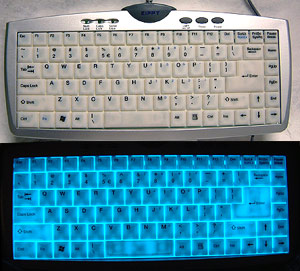
Now you can light up your Quake sessions between friends. I’m going to review the Zippy EL-610 USB keyboard. In its essence, it’s a notebook style keyboard, with a low keystroke and with a special feature. The buttons will glow in the dark, lightening up your keyboard when it’s dark in the room. As you can see in the picture, the light has a blue nuance.

Behind the 88-translucent keys is a flat sheet of electro-luminescent material - the same stuff that puts the glow in “Indiglo” which lights up watch faces around the world.

Like I mentioned, the keyboard should be connected to your USB plug, to receive power, and its main purpose is usage in environments where there is insufficient light. Being only 18mm thick and weighting less than 500g, it would be a great asset to any travel bag. No software is required for this keyboard to work on Windows 2000 or WindowsXP platforms which have at least one USB port free.

The electro-luminescent light generates no heat, but it creates a little imperceptible buzz sound that you hear when you’re a first time users. By using it everyday on a regular basis you finally get to automatically ignore the sound.

Despite my thinking, they’re not expensive. The cheapest I’ve found goes up to ~$45 and the most expensive retails around $60.


Featured Tags , ,


Sphere this entry»

digg it! reddit! Submit to Netscape Bookmark to delicious StumbleUpon! Newsvine Hugg it!

The half keyboard - weird, easy, different

January 21st, 2007
halfkeyboard

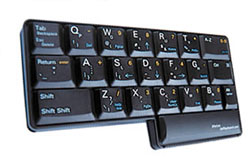
I’ve wrote about many types of keyboards so far, but this is an interesting concept. The Half Keyboard is a one-handed version of the standard desktop keyboard. It uses full-size, high-quality laptop-style keys for excellent typing comfort and speed.

The product in the picture is designed for people that want to type with their left hand. If you want to use your right hand or use them both alternatively, there’s also the 508 keyboard. The 508 Keyboard gives you the best of both worlds � one-hand and two-hand typing. It’s a full-size, standard keyboard and it lets you decide whatever is more convenient.

So, how does it actually work? All you have to do is place your hand on the keyboard, in the standard position. If you take a closer look, the letters under your hand are exactly the same letters on your regular keyboard. Cool, the job is half done so far. How about the other half? Well, to reach the second half, you’ll have to press SPACE, and there we go. Should you need to type a space, tap the key.

You shouldn’t be expecting a high typing rate, especially if you’re a beginner, but the analysts say that after 30 hours of using the Half Keyboard, you can type up to ~88% of your regular typing speed. You decide if it’s worth it or not.
Read the rest of this entry »


Featured Tags , ,


Sphere this entry»

digg it! reddit! Submit to Netscape Bookmark to delicious StumbleUpon! Newsvine Hugg it!

Cool trick to rename your Start button

January 20th, 2007

I remember the first book I read about Windows ’95. They were beginning proudly to present the differences between it and it’s predecessor, Windows 3.11, and the first thing they mentioned was the Start button.
Now here’s an interesting trick if you’re tired of that green little button in the lower left corner of your screen. It’s quite simple and it doesn’t take more than 2-3 minutes.

If you wonder how come you missed it so far, I’ll tell you. It’s actually hidden, as in not available, and we’re going to have to tweak your computer up a bit.

The process consists in a single step and that would be editing explorer.exe. For this, we will need a simple tool, that I provided for you for a quick download here. It’s called Resource Hack and it’s just about everything we need. So, download the ZIP archive, extract it and run “ResHacker.exe” from inside the archive. Click File, then OPEN, then point out your ‘explorer.exe’ in your Windows directory.

A browsing tree should open with the menus on the left. Click on String Table and you will see some numbers. Expand 37 (or 38) and click on “1033″. You should see a quoted line in the right window, that says: 578,”start”. You can make the desired change for 37 and 38 as well. So, replace the “start” between the quotes with whatever you want it to display, then click “Compile script”.

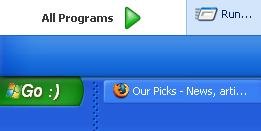
Now, all you have to do is restart your computer, or simply log off and back on. The start button will display the chosen text. Here are sample results below. Enjoy the trick.
startbuttonbefore startbuttonafter
BEFORE AFTER

UPDATE: Due user comments, I’ve considered the following trick. If you can’t overwrite explorer.exe, save the file to “explorer2.exe” for example, in C:\Windows (or whatever your Windows directory is), then you’ll have to tweak up the Registry to accept the settings.

Go to Start, click Run and enter “regedit” in the text box. Push Enter, then browse through the tree up to HKEY_LOCAL_MACHINE -> SOFTWARE -> Microsoft -> Windows NT -> CurrentVersion ->Winlogon. Check out the list, and you’ll have a “Shell” entry mentioning “explorer.exe”. Change it to “explorer2.exe” and reboot/logoff.

This should be it for good ;)


Featured Tags , , ,


Sphere this entry»

digg it! reddit! Submit to Netscape Bookmark to delicious StumbleUpon! Newsvine Hugg it!

9 funny versions of Google’s front page

January 20th, 2007

Long live the Photoshop talented users. I have gathered from all over the internet 9 funny Google mock-ups I liked. I’ll say nothing more, and I’ll let you enjoy the images and their description. Click the thumbnails to enlarge the photos.

Google Despair - The search engine for the irretrievably lost. Search for your youth, innocence, brain cells or for general sanity. Any search is hopeless in despair. gdespair
Google Ex-Girlfriends - Hookup search engine. Google is not responsible for divorces, separations, unplanned children or murders that result from using the service ghookup
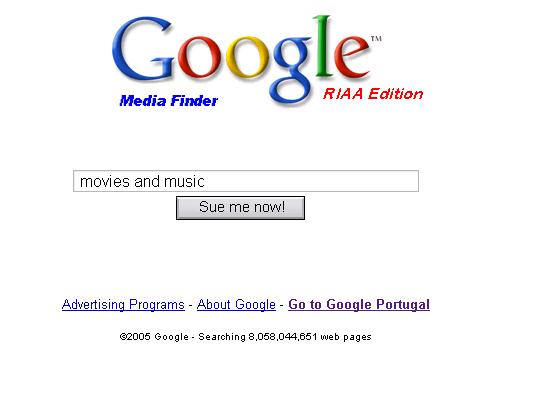
Google Media Finder - RIAA edition. Do you dare searching for copyrighted materials? Sue me now. gmedia

Read the rest of this entry »


Featured Tags , , ,


Sphere this entry»

digg it! reddit! Submit to Netscape Bookmark to delicious StumbleUpon! Newsvine Hugg it!

5TB HDD by Fujitsu

January 20th, 2007

Fujitsu

Fujitsu is developing a technology that allows creating hard drives with a data density of 1TB per square inch (5 times more than what’s today on the market), thus making possible to create 5TB HDD for the desktop users and 1.5TB for nootebooks.

Today’s record for HDD data density is held by Seagate, with a density of 421GB/square inch.


Featured Tags , ,


Sphere this entry»

digg it! reddit! Submit to Netscape Bookmark to delicious StumbleUpon! Newsvine Hugg it!