Developers, Developers, Developers develop!

February 28th, 2007


It might be true that the video is a little overreacted but it contains actual footage of Steve Ballmer, SEO at Microsoft. Although this video was added somewhere in 2005 it still represents the Redmond company, I mean Ballmer is SEO and Chairman, he is Microsoft. I don’t love Microsoft and I don’t hate Microsoft but watching this video makes me wonder at its policy.

Just compare: that guy being your boss at the office or working for Google that has it’s own spa, restaurant, gym, etc. for its employees.

Featured tags:

Sphere this entry»

digg it! reddit! Submit to Netscape Bookmark to delicious StumbleUpon! Newsvine Hugg it!

iPhone vs Smartphone comic inspired from Mac vs PC ads

February 28th, 2007

Unless you have been wandering around with a bucket on your head, you have probably seen that Apple launched a heavily debated campaign last Christmas, trying to prove you once more the multitude of reasons why you’d need a Mac. However, the PC fought back, and the battle continues. This is overall a quite interesting concept and many people have tried to follow.

I have found this funny comic strip that is trying to represent the differences between an iPhone and a Smartphone and which I will be reproducing further. I’m looking forward to hear your comments.
Read the rest of this entry »

Featured tags:

Sphere this entry»

digg it! reddit! Submit to Netscape Bookmark to delicious StumbleUpon! Newsvine Hugg it!

Uber-geek’s dream PC

February 28th, 2007

We all strive to own the coolest PC configuration. The coolest mouse, the coolest keyboard, a sound system to envy and so on. Well I was wondering what’s the dream machine for a computer addict and I’ve thought at something like this:

The main unit

We’ll start with the beginning, the case is supposed to be one of the main attractions of your system. There was a trend of highly sophisticated cases with neons and glowing fans, but that’s all over now. The new hype consists in components showing as much as possible, preferably mounted on a wall or floating in thin air as shown here.
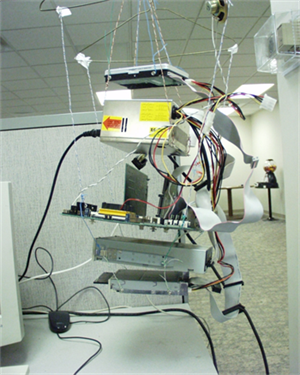
102704-floating-pc-mod.png

The Keyboard

Now that we’ve got over that we should cover the basic input, like a keyboard. But classic keyboards have many a problem, such as dirt getting between the keys, you have to bother your fingers with pushing buttons all day, not cool at all. What you really need is a small, compact, easy to use and to carry, Bluetooth Laser Virtual Keyboard. It uses rechargeable batteries that last for 120 min, and it has a height of only 3.5 inches.
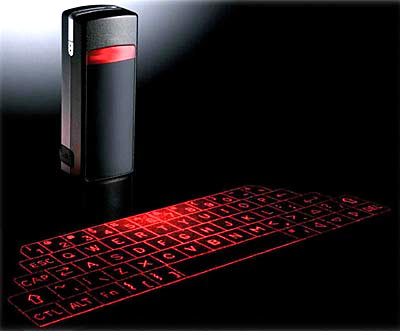
virtual_keyboard.jpg

The mouse

The mouse is not just a pointing tool, it’s the extension of your mind within the computer. Hence it must be perfectly adapted to your needs. Such mouse must be ergonomic, precise, and smart. The Logitech MX Revolution does all that and a lot more. It senses what application you are using and switches the scrolling mode concordantly, you can turn the wheel ‘click’ on and off and it has a neat Li-Ion battery.
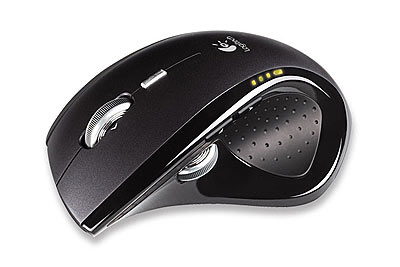
sleek_mouse.jpg

The monitor

A monitor must be large. This is the rule when talking about monitors now-days, large, slim and bright. Well the Athens Flat-Panel Monitor sure is large measuring 5 meters in width (that’s 5 ‘normal’ monitors) and it supports resolutions of 19200×2400 pixel. That’s HD and pure visual enjoyment. On the other hand it seems that it’s not the best commercial product as the company making them went out of business, nevertheless this is a must for your supersystem.
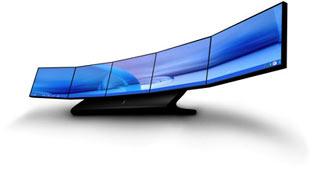
athens_monitor.jpg

The Sound System

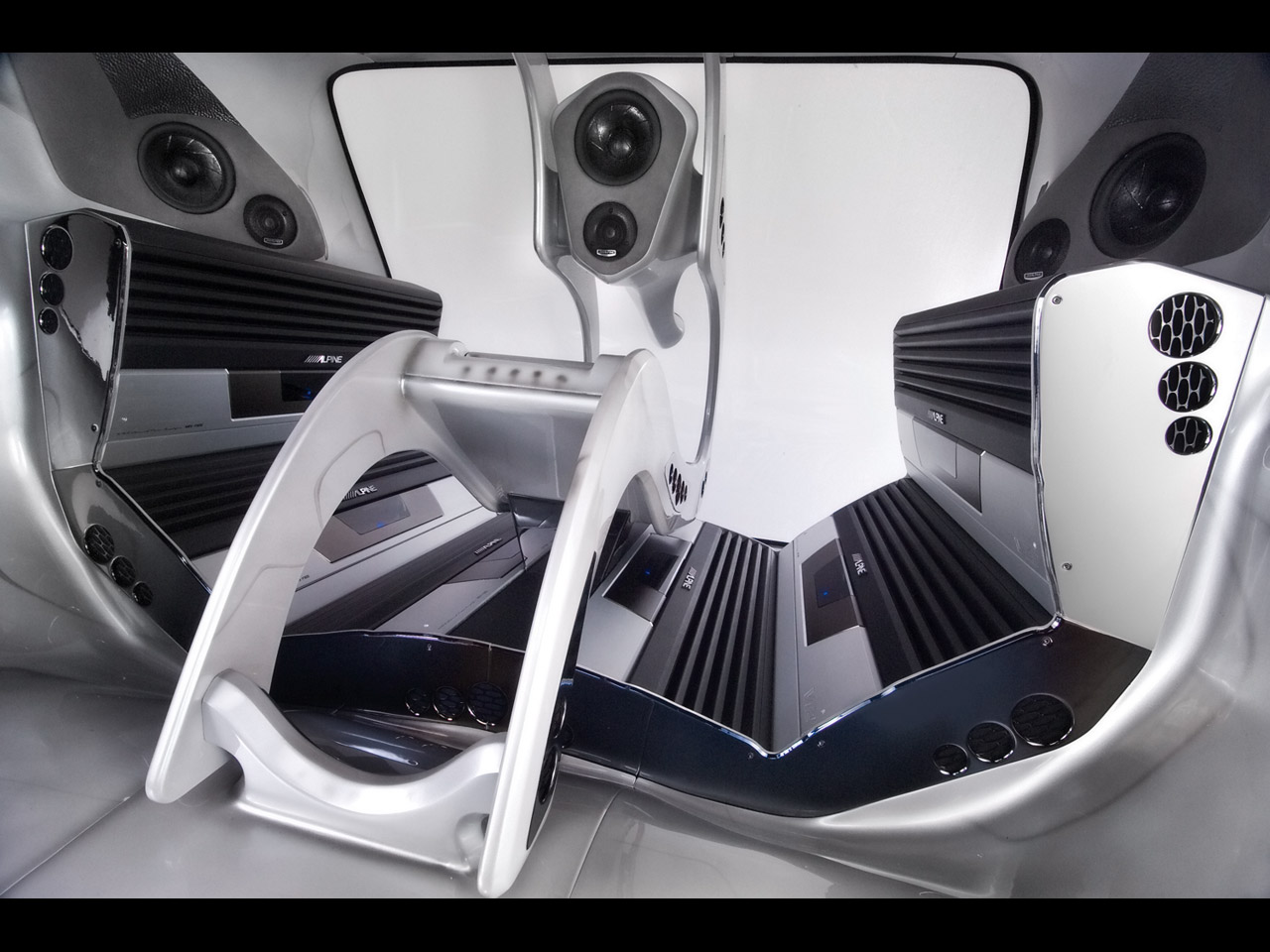
Last but not least the sound system is crucial for the ultimate PC. The sound must not be a addon, it has to be am integrated part of your system. It has to be all around you and it has to provide the clearest sound for you to enjoy. Such immersion can be obtained only with a machine as the one showed below, that’s capable of putting you in the middle of the audio storm. Grace to Alpine.
apline_supreme.jpg

There you have it, the base for the ideal PC, I’m sure that you can find better examples for each category, but the main idea is the same. Watch out for the supercomputer!

Featured tags:

Sphere this entry»

digg it! reddit! Submit to Netscape Bookmark to delicious StumbleUpon! Newsvine Hugg it!

The first iPhone ad worths $1,7 million dollars

February 27th, 2007

You are going to see a video that appears to be very simple and easy to produce, but despite that, Apple paid not more, not less than $1,7 million for its making and distribution. It has gone live last night, during the Oscars and it contains snippets of Hollywood stars saying “Hello” on different types of phones, from the plain old rotary phone to the iPhone we’re all going to see.

A total of twenty-eight actors from all eras of cinematography and even a couple of animated characters go through saying “Hello”, except two that say “bonjour” and “yo! yo!” (now that’s a nice touch, eh?), until the very end when the iPhone appears on the screen, immediately followed by a big “Hello” message on a black screen and a “Coming in June” finale.

So now we know. It’s June…
Enjoy the video.

Featured tags:

Sphere this entry»

digg it! reddit! Submit to Netscape Bookmark to delicious StumbleUpon! Newsvine Hugg it!

Vista feedback

February 26th, 2007


Much frustration Vista creates!


Seriously speaking now, people tend to dislike the new operating system from Microsoft. For many a reason that is, but in the top there seem to be the incompatibility with a great deal of hardware devices, driver problems, installation problems, high requirements, etc.

The question is: To Vista or not to Vista?

Featured tags:

Sphere this entry»

digg it! reddit! Submit to Netscape Bookmark to delicious StumbleUpon! Newsvine Hugg it!

mailto() basic guide

February 25th, 2007

mailto.jpg

Many of you have wondered how do those cool links work, those that launch your default mailing client with an email ready to be sent. Well so did I until some time now when I needed such a link for one of my projects. I do realize that you can find plenty information on this subject online but I wanted to put together an easy to use guide to create your own mailto() links.

Let’s start with the beginning: mailto() is used with the almighty <a> HTML tag like shown below. This is quite simple and if you add an anchor to it you get a simple link. This is useful for most purposes, but you can evolve:

<a href=”mailto:user@domain.com”>

To use multiple recipients you can use something like this, and you can add as much recipients as you please separated by “,”.

<a href=”mailto:user1@domain.com,user2@domain.com”>

Also if you wish to send a copy or a blind copy of the email to a certain address you can use the syntax below. After all the main recipients are added you must use “?” after that you just separate commands by “&”. Remember to use “?” just once after all the main recipients.

<a href=”mailto:user1@domain.com?&cc=user2@domain.com”>

Here is another example:

<a href=”mailto:user1@domain.com?&cc=user2@domain.com&bcc=user3@domain.com”>

Using the above commands you can create the basic structure for an email but there’s more. For example you can choose the title and put some text in the body of the email.

The following line creates an email to user@domain.com with the title “Test subject”.

<a href=”mailto:user@domain.com?subject=Test%20subject”>

Furthermore, you can add some standard text in the body:

<a href=”mailto:user@domain.com?subject=Test%20subject&body=Test%20body”>

You might have noticed the “%20″ sign between words within the title or the body. That symbol is used by the HTML to mark an empty space. You don’t have to include it because the empty space will be transformed automatically. On the other hand if you want to mark a new line you have to use “%0A” like so:

<a href=”mailto:user@domain.com?& body=A line%0A%0AAnother line%0A%0AThird line”>

Tips & Tricks:

A good suggestion is to encode your e-mail address in order to limit spam to the given email address, or maybe you want to encode the whole mailto() code. A good way to do this is to follow this link.

It’s good to know all the information above in order to understand the syntax of mailto() but in the end I strongly recommend that you use links like this to generate the code for you and then ecrypt it and use it.

Good luck and keep experimenting!

Example: Sample link

Featured tags:

Sphere this entry»

digg it! reddit! Submit to Netscape Bookmark to delicious StumbleUpon! Newsvine Hugg it!

Google office apps: To switch or not to switch?

February 25th, 2007

googleapps

We’ve all assisted Google launching the Premiere web applications package a few days ago. Some of us considered switching, some of us are still holding the grounds, but one thing is certain. There will be debates. Google is obviously trying to conquer Microsoft’s office suite market and they’re playing it rough. Let see a few reasons in favor or against the migration to the new service.

In favor:
* The price - Instead of paying ~$500 for the full Microsoft Office suite, you might as well pay $50/year to Google. I am not referring to the price per quality ratio right now. It’s strictly about the price. It’s cheaper, even on a long term basis.
* Remote accessibility - With Google, your documents will be accessible from almost everywhere. And you’ll see why I’m phrasing it like that a bit later. However, your data is accessible with every computer with an internet connection.
* Minimum computing power - Since everything is browser-based and you will not run any third-parties on your own machine, the computing power is reduced significantly, transforming even those old computers into something useful.

I am not going to discuss the so-called security advantages, since it’s all relative, but I am going to mention the fact that with Google office apps, you will get rid of those updating procedures you got used to with Microsoft, you won’t have to worry about license restrictions, and you won’t have to spend time and resources installing the suite when you feel like adding a few computers to the network.
Read the rest of this entry »

Featured tags:

Sphere this entry»

digg it! reddit! Submit to Netscape Bookmark to delicious StumbleUpon! Newsvine Hugg it!