January 30th, 2007
We all know the Google Advanced Search page that lets you refine your searches and find what you need faster. But how many of us understand the complicated URLs the search engines generates?
Well I am not saying that I’m some sort of expert but here are some information regarding the URLs generated by Google. Let’s start by looking at one such URL:
http://www.google.com/search?as_q=nintendo+wii&hl=ro&num=10&btnG=C%C4%83utare+Google&
as_epq=&as_oq=&as_eq=&lr=&as_ft=i&as_filetype=&as_qdr=all&as_occt=any&as_dt=i&as_sitesearch=
You don’t understand much and it looks quite long but it doesn’t have to be this way. Many of the variables included are not even used in the query. Here are the basics:
What you should know is that you always start with: http://www.google.com/search?. This tells Google it’s an advanced search and that there are some variables to come. Besides, remember that all the variables must be connected with ampersands (&; ex. as_q=nintendo+wii&hl=ro) and if you want to use more than one search terms just use ‘+’ (ex. nintendo+wii) between them. Speaking of variables here are the most important tags you can use:
as_oq -> This tells Google to find pages in which at least instance of nintendo OR wii is found
as_q -> This means that you look for nintendo and wii in the same page
as_epq -> Google translates this as a Google search of “nintendo wii”, searches the exact phrase ‘nintendo wii’
num -> The number of results you want displayed, it ranges from 0 to 100. If you set num to 0 you will get the ‘No match found” message
safe -> If you set this to active the Google Safe Search is on and the adult material will be filtered
as_eq -> Use this to exclude a term from your search
as_qdr -> Shows only results that have been updated in the given time interval. Possible values: y (year), m6 (6 months), m3 (3 months).
as_sitesearch -> Limits the search to a specific domain or TLD (.us; .gov; .co.uk; .ro; etc)
as_occt -> This is set by default to ‘any’ but if you change it you can search in: title, url, links
The goal of this article is not exactly for you to use from now on hand-made search URLs but yo better understand how the Google search engine works and if you please to create some URLs for yourself.
Read the rest of this entry »
Featured Tags
google,
tips
Sphere this entry»


Posted in Internet by Bogdan Popa | 30 Comments »
January 30th, 2007
As I was telling you in the first part of this article, I am glad that we’ve got over the basics of Google searching so now we can look into more interesting search options.
First of all there is a part of Google’s syntax that allows you to tell it where exactly to search. This comes in handy when you know part of a URL or maybe a title but you can’t find the exact page.
You can use ‘intitle:’ to search only the titles for web pages, as many of the other functions that are to follow ‘intitle:’ has a variation, namely ‘allintitle:’ that includes all the terms that follow in to the title search:
intitle:”Santa Maria” boat -> searches in title for Santa Maria and does a search on the term boat
allintitle:pirate ships treasure -> searches in title for all the terms
I think you’ve got the idea so here is a list of syntax words that work the same way:
‘intext:’ works the same way only restricts the search to the body of web pages, excluding URLs or titiles
‘inanchor:’ a anchor is the description for a text link: <a href=”http://our-picks.com”>Our-picks</a> here Our-Picks is the anchor.
‘site:’ here you can use bot hosting and domain;this works well with the main page of a site (ex: cars site:co.uk)
‘inurl:’ searches the URL for sites, including subdirectories, it is highly recommended that you remove the ‘http:’ prefix before the search
‘link:’ this one is interesting since it shows you the sites that point to a specific URL, any page of the site not only the main URL
‘cache:’ returns the page from Google’s cache as it looked the time, useful when you want to find something on a page that changes frequently
‘filetype:’ works great with other syntax elements when you need a particular file type, like ‘.pdf’ or ‘.doc’ etc. (ex: planes filetype:pdf)
‘related:’ returns a list of pages that Google considers are related to one another
‘info:’ returns links with more informations about a given page, works well only if the page was indexed by Google.
Read the rest of this entry »
Featured Tags
google,
tips
Sphere this entry»
Posted in Internet by Bogdan Popa | 10 Comments »
January 29th, 2007
The same way you clean up your house before your guests arrive, the same way you should get your website ready for Google’s crawler, as this is one of the most important guests you will ever have. According to that, here are 10 things you should double check before submitting your website to the index. If you want, you can view this article as the correction of the top 10 mistakes made by webmasters.
1. If you have a splash page on your website, make sure you have a text link that allows you to pass it.
I’ve seen many websites with a fancy flash introduction on the index and no other way to navigate around it. Well, Google can’t read into your flash page, and therefore it cannot bypass it. All you have to do is put a text link to your website’s second index, and the deed is done.
2. Make sure you have no broken links
I know this is kind of obvious, but you’ll be surprised to find out how many errors is the Google crawler experiencing daily due broken links. Therefore, you’d better check and double check every internal link of your webpage before submission. Don’t forget that your links are also your visitor’s paths to your content. It’s not all about Google, you know :)
3. Check the TITLE tags
Since you are able to search in title tags on Google and since the title tags is displayed in the top of your browser window, I’d say this is an important aspect you need to check. This doesn’t mean you have to compile a >20 keywords list there. Instead, make it a readable sentence since it’s viewable by both crawlers and surfers.
4. Check the META tags
Rumors about Google not caring about META tags are not 100% correct. Google relies on these tags to describe a site when there’s a lot of navigation code that wouldn’t make sense to a human searcher, so why not make sure you’re all in order and set up some valid KEYWORDS and a valid DESCRIPTION. You never know.
Read the rest of this entry »
Featured Tags
google,
tips
Sphere this entry»
Posted in Internet by Bogdan Boghiu | 47 Comments »
January 28th, 2007
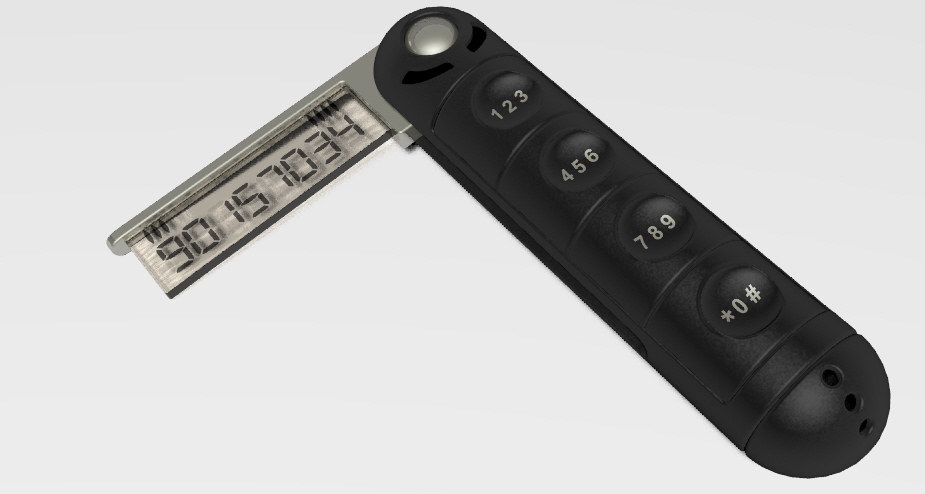
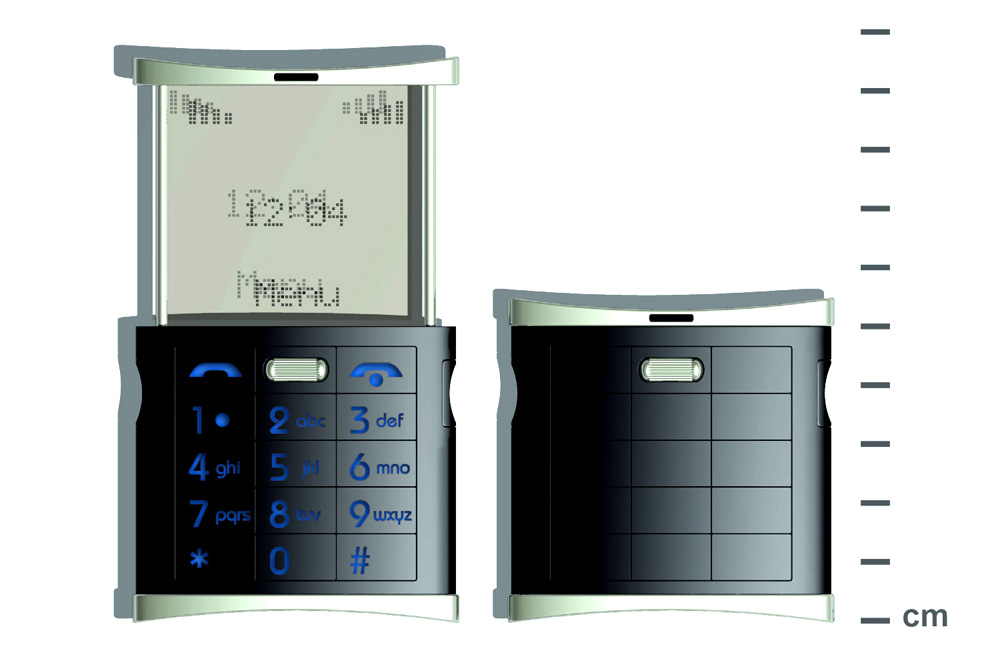
Yes, it is cool, despite the fact that it doesn’t rely on gadgets, and stuff that we seem to rely on nowadays. The only bad thing is that it’s not real, yet. It is the product of an ingenious designer called Rune Larsen. If the name rings a bell, he is the same person that designed the Tiny phone - the one not much larger than a toothpick. But, despite the earlier version, this is much more realistic when it comes to building it. There’s much more room for the battery, microphone, antenna, and the other essential stuff you can find inside a phone.
According to the inventor, the phone is equipped like a 1996 one (I wish I had one of these back in 1996). It is 5.5 centimeters tall closed, and 9 centimeters open.
In a world dominated by the arrival of the iPhone, I must say that, given the choice, I’d buy one of these in a heartbeat, just for the fun of having it. Here are some other photos of the older phone (Tiny Phone), and the Eclipse Phone. (click to enlarge).



Featured Tags
cool,
gadgets,
phone
Sphere this entry»
Posted in Hardware, Reviews by Andrei Maguleanu | 6 Comments »
January 28th, 2007
We all use Google every day, quite a few times a day even and most of us are very pleased with it. But are the results to your searches always that relevant!? Often you find irrelevant results and it takes you longer than it should to find what you want. But is this because of Google’s faulty search algorithms or is it because sometimes our searches can be ambiguous?
Well whatever the case after the Gmail search article I decided to expand the subject a little. I know some things you will find here you already know and some of them might be new for you. Anyway you can consider them as a reminder of what searching on Google really means.
I will start with the basic syntax that I am sure all of you know, but it’s the basis for further more complex syntax. For example:
You can search whole phrases by using quotes like “Rose Chappel” instead of plain Rose Chappel. The first query searches for the Rose Chappel and the second searches for the words Rose and Chappel.
I presume you also know about word exclusion, when you want to exclude a certain term from your search: PS3 -price. This will exclude all the results that contain the word ‘price’. You can do this with phrases also: PS3 -“technical specifications”. Note that there must be no space between ‘-‘ and the word to exclude.
What you must know is that Google excludes by default some common terms like I, of, the, etc. If you ever need to make Google include a given term all you need to do is put a ‘+’ in front of it: +the tower. Note that, when words like these are included within a phrase search they are automatically included like: “the tower”.
Now lets talk about some more complex searches whit ‘AND’ & ‘OR’. By default Google includes all the terms in the search but you can specify that one word OR the other should be searched. To do this insert the capitalized OR in your queries: expensive (red OR green) dress. You can also replace the OR with “|” the so called ‘pipe’ symbol. Needless to say that you can use OR with exact phrase searches: “complete idiot”|”total idiot”.
Speaking of synonyms you can ask Google to search synonyms of a certain word you search by using the ‘~’ key. For example: ~wood is going to search for both wood, woods, forest, etc.
Read the rest of this entry »
Featured Tags
google,
tips
Sphere this entry»
Posted in Internet by Bogdan Popa | 35 Comments »
January 26th, 2007
I know what you’ll say, that you can do all this stuff using the ‘Show search options’ button. But if you’re like me and you like doing things simple, quick and using your keyboard then these tips might just be useful.
We all know the search bar in our Gmail accounts that lets us keep track of the e-mails we sent and received over time. Also we all know the advanced menu that helps us find that important e-mail you’re looking for 30 minutes. If you combine the two mentioned above you get the following:
Here are some standard tags to find e-mails, their function can be easily deduced:
- from:
- to:
- subject:
- label:
All you have to do is type it in the search box like so:
from:[email protected]
or maybe
to:[email protected]
Another interesting search criteria is ‘filename:’ after it you can add the name of a file attached to a e-mail and better yet you can put there only the extension and it will find all the files with the given extension.
A interesting combination is “in:” and “is:”. It tells Google where to look ( inbox, spam, anywhere but it does not work with the ‘sent’ folder) and is: has several values (starred, unread, read). You can use them separately or you can come up with expressions like:
in:inbox is:unread
There are also several searches I think you will find easy to understand:
before:date (yyyy/mm/dd)
after:date
cc:
bcc:
Now that you know this basic syntax you can evolve using combined searches like:
to:etherfast subject:(hardware OR playstation)
from:etherfast before:2006/01/23 subject:games “WoW” price
There you have it, the possibilities are practically infinite, that’s what I like about Google, it just provides the tools for you to enjoy.
Featured Tags
gmail,
google,
tips
Sphere this entry»
Posted in Internet by Bogdan Popa | 33 Comments »
January 24th, 2007
Now here’s a little gadget that aims directly to those that really have money to spend. However, that doesn’t keep us, mortals, to have a look. What you can see in the picture is the world’s most expensive mouse, that costs ~$25,000. The retail price is set at 18,600 Euro.
The product is called the Diamond Flower and is being produced by Pat Says Now. You might be wondering why a simple concept as a computer mouse can be so expensive. Well, 59 brilliants are scattered all over the mouse’s surface. Also the main surface is made out of 18-K white gold. Out of the 59 stones I mentioned, one is about 4mm in diameter, practically doubling the others.
After reading a few details on the producer’s website, I noticed that technically speaking, the gadget is just a plain old computer mouse. Has 3 buttons, a scrolling wheel, PS/2-USB connectivity PC or MAC. What I’m showing you in the picture is the scattered version of the mouse, but its name (Diamond Flower) comes from another designed version of the product, one whose brilliants are arranged to form a flower silhouette.
Personally, even if I’d have that much money to practically throw away, I wouldn’t spend them on this kind of a gadget. What about you?
Featured Tags
computer,
expensive,
gadgets,
mouse
Sphere this entry»
Posted in Gadgets, Hardware, Reviews by Bogdan Boghiu | 14 Comments »