XGL: day to day usage

January 28th, 2007

Yesterday, this YouTube vid got dugg by over 5000 users, though there was nothing new about it. I have seen it for the first time a long time ago, and it is on YouTube for 7 months now. After seeing it for the first time, I started wondering how practical could such a desktop environment be. Except for the people that usualy have their desktop full of icons, there’s no practical need for it.

This video found on NetBoy’s page caught my attention: here’s something that’s not spreaded and popular as it should be - XGL. Now that’s something I can use and find is useful: dividing your applications on a number of desktops and sorting them by type or by usage or by anything you may want. The best thing about it is that it’s free.

For all I care, I would love the first 30 minutes of play; I wouldn’t use all the features or at least most of them on a day-to-day basis, but it would definitely ease my works more than BumpTop. Real life doesn’t always apply to desktops.


Featured Tags , ,


Sphere this entry»

digg it! reddit! Submit to Netscape Bookmark to delicious StumbleUpon! Newsvine Hugg it!

Blogging from your desktop

January 28th, 2007
bloggerlogo

Writing important text in a browser window can be an awful experience, especially if the written text exceeds a few rows. Supposing you have a WordPress blog out there, you would normally connect to the admin interface and type the text into an online form, editing and formatting it by hand. If your browser crashes, or if your Internet connection drops, you know as well as I do that some of the text you typed *might* be lost. And if you compare the editing form with a traditional word processor such as Word, you find a big difference between the available features.

Like I said, a big reason for the difference mentioned above is that Word can take advantage of the processing power that you have at home, while your browser needs to stay lightweight to transfer data quickly over the network. These applications function more like traditional word-processing applications and offer some extended features that your browser doesn’t offer. To get started, you simply need time to experiment. I am going to present a desktop blogging client that might change the way you post to your blog.
Read the rest of this entry »


Featured Tags , ,


Sphere this entry»

digg it! reddit! Submit to Netscape Bookmark to delicious StumbleUpon! Newsvine Hugg it!

Search Gmail geek-style

January 26th, 2007
googlemail.jpg

I know what you’ll say, that you can do all this stuff using the ‘Show search options’ button. But if you’re like me and you like doing things simple, quick and using your keyboard then these tips might just be useful.

We all know the search bar in our Gmail accounts that lets us keep track of the e-mails we sent and received over time. Also we all know the advanced menu that helps us find that important e-mail you’re looking for 30 minutes. If you combine the two mentioned above you get the following:

Here are some standard tags to find e-mails, their function can be easily deduced:
- from:
- to:
- subject:
- label:

All you have to do is type it in the search box like so:
from:[email protected]
or maybe
to:[email protected]

Another interesting search criteria is ‘filename:’ after it you can add the name of a file attached to a e-mail and better yet you can put there only the extension and it will find all the files with the given extension.

A interesting combination is “in:” and “is:”. It tells Google where to look ( inbox, spam, anywhere but it does not work with the ‘sent’ folder) and is: has several values (starred, unread, read). You can use them separately or you can come up with expressions like:
in:inbox is:unread

There are also several searches I think you will find easy to understand:
before:date (yyyy/mm/dd)
after:date
cc:
bcc:

Now that you know this basic syntax you can evolve using combined searches like:
to:etherfast subject:(hardware OR playstation)
from:etherfast before:2006/01/23 subject:games “WoW” price

There you have it, the possibilities are practically infinite, that’s what I like about Google, it just provides the tools for you to enjoy.


Featured Tags , , ,


Sphere this entry»

digg it! reddit! Submit to Netscape Bookmark to delicious StumbleUpon! Newsvine Hugg it!

Would your Firefox need mouse gestures?

January 26th, 2007
Firefox_mouse_gestures

I remember when I first tried Opera, that was supposed to be “the fastest browser on Earth”, I accidentally pressed a mouse button combination and weird lines started drawing through the screen. The mouse gestures (I was to find out about them later) are stylized motions of the mouse cursor itself, that can be used as forms of commands and that can be mapped to a specific action. For example, you could have quickly moved the mouse towards the left direction to go back to the previous page.


At that time I was still using Internet Explorer and new features like tabbed browsing or cached pages seemed like heaven. I started using Firefox since one and a half years ago, and I of course I sticked to it until now. With the discovery of widgets that are able to completely transform Firefox now, it does seem like the best browser on Earth for me, not necessarily the fastest.

However, I did not see the gestures feature being implemented in the core system, so I thought there might be a Plug-In to do so. Here it is. The extension allows you to execute common commands (like page forward/backward, close tab, new tab) by mouse gestures drawn over the current webpage, without reaching for the toolbar or the keyboard.

You can also use click-only “rocker” gestures which are even faster than drawn gestures. This cool plugin is compatible with your Thunderbird aswell.


Featured Tags , ,


Sphere this entry»

digg it! reddit! Submit to Netscape Bookmark to delicious StumbleUpon! Newsvine Hugg it!

How to install and run any Linux distribution with just ONE click

January 24th, 2007
linuxpenguin

A common known project started 5 years ago, focused on developing and maintaining a project called CNR (Click ‘n’ run). It’s a standardized process for finding, evaluating, installing, and updating desktop software for the most popular Linux distributions, both Debian and RPM based.

CNR is a free and easy way to access over 20.000 desktop Linux products, packages and libraries, and all with a single mouse click. Finding, installing and managing software on your desktop Linux computer was never that easy.

CNR makes finding the right piece of software easy with user reviews, screenshots, descriptions, charts, and so on. When you find the software you want, with literally one click, it will be installed on your computer and icons will be added to your desktop and Start Menu. Also, CNR notifies you when updates are available for the installed applications via the main website, which you can easily install with one click as well.

Launching in the 2nd Quarter of 2007, CNR.com will be a free on-line digital software warehouse and one-click delivery service designed to solve the complexity of finding, installing and managing software applications on your Linux desktop computer. CNR.com will be the most extensive resource available anywhere for desktop Linux software. Search from tens of thousands of Linux software products, packages and libraries by title, popularity, similar software, category, author, or function, and then install the software with just one click of your mouse.

Linspire started to work on this project a year ago, and that changed the CNR technology completely. Like I said at the beginning of this article, it now supports multiple distributions, both Debian and RTM based.

Should you want to find out more about this interesting project, check out the FAQ, Screenshots, Press releases and official forums.

Personally, I think this technology will bring a lot of new users into the UNIX world.


Featured Tags , ,


Sphere this entry»

digg it! reddit! Submit to Netscape Bookmark to delicious StumbleUpon! Newsvine Hugg it!

The $25,000 computer mouse

January 24th, 2007
diamondflower

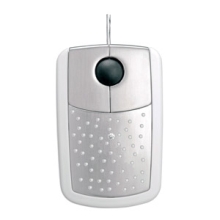
Now here’s a little gadget that aims directly to those that really have money to spend. However, that doesn’t keep us, mortals, to have a look. What you can see in the picture is the world’s most expensive mouse, that costs ~$25,000. The retail price is set at 18,600 Euro.


The product is called the Diamond Flower and is being produced by Pat Says Now. You might be wondering why a simple concept as a computer mouse can be so expensive. Well, 59 brilliants are scattered all over the mouse’s surface. Also the main surface is made out of 18-K white gold. Out of the 59 stones I mentioned, one is about 4mm in diameter, practically doubling the others.

After reading a few details on the producer’s website, I noticed that technically speaking, the gadget is just a plain old computer mouse. Has 3 buttons, a scrolling wheel, PS/2-USB connectivity PC or MAC. What I’m showing you in the picture is the scattered version of the mouse, but its name (Diamond Flower) comes from another designed version of the product, one whose brilliants are arranged to form a flower silhouette.

Personally, even if I’d have that much money to practically throw away, I wouldn’t spend them on this kind of a gadget. What about you?


Featured Tags , , ,


Sphere this entry»

digg it! reddit! Submit to Netscape Bookmark to delicious StumbleUpon! Newsvine Hugg it!

They’re baack!

January 22nd, 2007

We were saying a while back that the Pidjins closed down their website, but the evil birds are back in business! Today, the new website was opened, and although there are still some issues to be dealt with, such as the archive, Eugen and Tudor posted something while you wait for the new episode. No, it’s not a comic. Instead, it’s they’re first movie, which looks just like a movie trailer. It gives me goosebumps just thinking about it. Check it out below.


And when you’re done checking this out, you’d better check out the comic also.


Featured Tags , ,


Sphere this entry»

digg it! reddit! Submit to Netscape Bookmark to delicious StumbleUpon! Newsvine Hugg it!