September 13th, 2007
 Microsoft have brought out this nifty little mouse, the Mobile Memory Mouse 8000. US$100 gets you a re-charging wireless mouse with 1 GB of memory, 10 metre range and a battery life indicator. The memory sits neatly in the transceiver plugged into a USB port on your PC freeing up another USB port. The unit recharges when a magnetic connector from the mouse is attached to the transceiver in your USB port - very handy. The mouse boasts 4 way scrolling with Tilt Wheel Technology and sports five programmable buttons. There’s also an on/off switch to power off the batteries when not in use, a great energy saving feature.
As you can probably tell I’m quite taken with this little sucker. Well, almost, in the MS blurb there is no mention of the 1 GB flash memory being ReadyBoost compatible. So although it sports some excellent features it probably lacks the most obvious feature that a memory mouse should really have, an omission made even more glaring when you realise that the mouse is manufactured by the same company that produce the bloated OS in the first place. Come on MS, prove me wrong, tell me marketing screwed up and it is ReadyBoost compatible.
Source: I4U
Featured tags: microsoft mouse usb usb drive
Sphere this entry»


Posted in Hardware by JB | No Comments »
May 9th, 2007
One of the downsides of using a laptop is having to carry around all the extra bits and pieces with you, charger, connection to external display etc. Check out this little sucker - a mouse that folds up and slots into your PCMCIA slot. Of course the manufacturer is assuming you have nothing else in the slot however it certainly wouldn’t cause an unsightly bulge in your laptop bag if stored externally.

The SlimG4 folds out into a handy two button, touch sensitive scroll, USB mouse. It doesn’t look as if the unfolded position is adjustable so unusually sized hands may have issues with the mouse but for the average user this may well be a valuable addition to your laptop’s peripherals especially as it is priced around US$40 to US$45.
We do have one concern about its use under pressure - it does look a bit flimsy and we are worried what would happen if you applied a lot of pressure on the raised hinge. You wouldn’t want the G4 suddenly folding up on you when you are zeroing in on that sniper during a session of Halo. However as far as we are concerned anything that minimises space usage is good.
If anyone has used a SlimG4 please let us know what you think.
Source: engadget
Featured tags: laptop mouse pcmcia slot slimg4
Sphere this entry»
Posted in Hardware by JB | 1 Comment »
January 26th, 2007
I remember when I first tried Opera, that was supposed to be “the fastest browser on Earth”, I accidentally pressed a mouse button combination and weird lines started drawing through the screen. The mouse gestures (I was to find out about them later) are stylized motions of the mouse cursor itself, that can be used as forms of commands and that can be mapped to a specific action. For example, you could have quickly moved the mouse towards the left direction to go back to the previous page.
At that time I was still using Internet Explorer and new features like tabbed browsing or cached pages seemed like heaven. I started using Firefox since one and a half years ago, and I of course I sticked to it until now. With the discovery of widgets that are able to completely transform Firefox now, it does seem like the best browser on Earth for me, not necessarily the fastest.
However, I did not see the gestures feature being implemented in the core system, so I thought there might be a Plug-In to do so. Here it is. The extension allows you to execute common commands (like page forward/backward, close tab, new tab) by mouse gestures drawn over the current webpage, without reaching for the toolbar or the keyboard.
You can also use click-only “rocker” gestures which are even faster than drawn gestures. This cool plugin is compatible with your Thunderbird aswell.
Featured tags: firefox ie mouse
Sphere this entry»
Posted in Internet, Software by Bogdan Boghiu | 3 Comments »
January 24th, 2007
Now here’s a little gadget that aims directly to those that really have money to spend. However, that doesn’t keep us, mortals, to have a look. What you can see in the picture is the world’s most expensive mouse, that costs ~$25,000. The retail price is set at 18,600 Euro.
The product is called the Diamond Flower and is being produced by Pat Says Now. You might be wondering why a simple concept as a computer mouse can be so expensive. Well, 59 brilliants are scattered all over the mouse’s surface. Also the main surface is made out of 18-K white gold. Out of the 59 stones I mentioned, one is about 4mm in diameter, practically doubling the others.
After reading a few details on the producer’s website, I noticed that technically speaking, the gadget is just a plain old computer mouse. Has 3 buttons, a scrolling wheel, PS/2-USB connectivity PC or MAC. What I’m showing you in the picture is the scattered version of the mouse, but its name (Diamond Flower) comes from another designed version of the product, one whose brilliants are arranged to form a flower silhouette.
Personally, even if I’d have that much money to practically throw away, I wouldn’t spend them on this kind of a gadget. What about you?
Featured tags: computer expensive gadgets mouse
Sphere this entry»
Posted in Hardware, Gadgets, Reviews by Bogdan Boghiu | 13 Comments »
January 16th, 2007
Is it impractical? Comfortable? Easy to use? Let’s see.
I can’t help noticing that it looks like an iPod. Not quite, it’s a computer mouse. Actually, it’s one of thinnest mice ever made. It’s developed by Samsung, and it was announced at At the KES tech fair in Seoul Korea, last year. Like the title says, the mouse is only 8mm thick, and the scroll wheel moves from left to right, unlike the regular mice you’ve used so far.
It’s also equipped with 5 buttons and a retractive cable that makes it just perfect for laptops and portable devices. Pricing and availability was still unknown at the end of the year, but we’re looking forward to find out more information related to this product.
However, I wouldn’t feel like using that on my laptop. I’d rather stick to my touchpad than moving around and optical almost-flat piece of thing. If, in your opinion, still think this is thick, you should have a look at the Newton Peripherals website.
Featured tags: computers mouse
Sphere this entry»
Posted in Hardware, Gadgets by Bogdan Boghiu | 1 Comment »


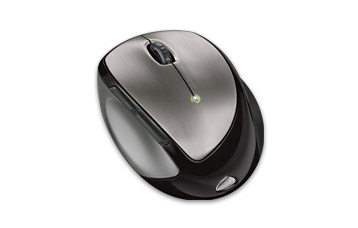 Microsoft have brought out this nifty little mouse, the Mobile Memory Mouse 8000. US$100 gets you a re-charging wireless mouse with 1 GB of memory, 10 metre range and a battery life indicator. The memory sits neatly in the transceiver plugged into a USB port on your PC freeing up another USB port. The unit recharges when a magnetic connector from the mouse is attached to the transceiver in your USB port - very handy. The mouse boasts 4 way scrolling with Tilt Wheel Technology and sports five programmable buttons. There’s also an on/off switch to power off the batteries when not in use, a great energy saving feature.