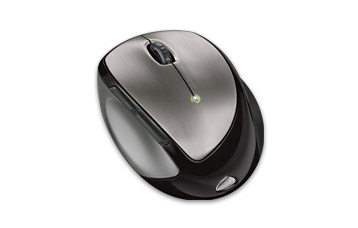
Microsoft have brought out this nifty little mouse, the Mobile Memory Mouse 8000. US$100 gets you a re-charging wireless mouse with 1 GB of memory, 10 metre range and a battery life indicator. The memory sits neatly in the transceiver plugged into a USB port on your PC freeing up another USB port. The unit recharges when a magnetic connector from the mouse is attached to the transceiver in your USB port - very handy. The mouse boasts 4 way scrolling with Tilt Wheel Technology and sports five programmable buttons. There’s also an on/off switch to power off the batteries when not in use, a great energy saving feature.
As you can probably tell I’m quite taken with this little sucker. Well, almost, in the MS blurb there is no mention of the 1 GB flash memory being ReadyBoost compatible. So although it sports some excellent features it probably lacks the most obvious feature that a memory mouse should really have, an omission made even more glaring when you realise that the mouse is manufactured by the same company that produce the bloated OS in the first place. Come on MS, prove me wrong, tell me marketing screwed up and it is ReadyBoost compatible.
We all know there are a few issues with Windows Vista, it runs oh so slowly on a ’standard’ PC, the startup time and it, well, just makes your PC look like a Mac ;)
Fear not, the guys at SuperTalent have come up with the Exelerator, a ReadyBoost drive for your Vista disabled enabled PC. Nothing new, eh? Well the Exelerator sits inside your PC. Yep, no nasty dangly bits hanging from your USB ports, this sucker hides away inside your PC case.
Whilst there it makes use of the Vista ReadyBoost feature which speeds up Vista by using the drive to cache some data rather than the sluggish hard drive.
Now Tom’s Hardware goes into greater detail on how ReadyBoost all hangs together and indeed on how to set up a USB 2.0 ReadyBoost capable drive on your PC. Over at Legit Reviews they too have a great article specifically on how to set up the Execlerator in your PC. However they conclude that unless you have a spare ReadyBoost capable drive lying around then you are better off installing more memory on your PC to get the best RAM bang for your buck.
For the record my USB 2.0 1 GB thumb drive is NOT ReadyBoost capable, which I find quite ironic as I bought it as part of a package when I bought my Vista-shackled laptop. Go figure.
Back in January we showed you the World’s Smallest PC. Well now we may have another contender for the title. Calao, a small French firm based in the Alps, is about to launch a USB based Linux single-board computer, the USB-9260. It measures a cute 3.3 by 1.4 inches and runs at 190MHz. Not exactly speedy but what do you expect from a ‘puter you could lose in your laptop bag!
As for memory, it has 64MB of SDRAM and 256MB of flash, and there’s an ethernet port with a couple of USB 2.0 ports as well. These little puppies will probably be of more use for industrial or manufacturing purposes but could still be a status symbol at the next Linux users convention.
We decided to ignore obvious input/output jokes and just state the facts. Well the facts are that you plug it into a USB port and it humps your laptop. Thats about it really. It’ll probably amuse your work colleagues for a couple of hours and help you wile away a lazy afternoon at the office. Anyway here’s a great video of the little pooch in action.
Two things in the video amused us. One was the plastic cover on the USB connector, presumably to ensure no viruses were transferred. Secondly we’d love to know what the pop up message was on the laptop when the doggie got going - some sort of buffer overflow we guess.
Know a good story? Send it to tips(at)our-picks.com and we'll read it, turn it inside out, strip it naked, and we might transform it into a shiny front page article. And of course, you'll get your credit :).


 Microsoft have brought out this nifty little mouse, the Mobile Memory Mouse 8000. US$100 gets you a re-charging wireless mouse with 1 GB of memory, 10 metre range and a battery life indicator. The memory sits neatly in the transceiver plugged into a USB port on your PC freeing up another USB port. The unit recharges when a magnetic connector from the mouse is attached to the transceiver in your USB port - very handy. The mouse boasts 4 way scrolling with Tilt Wheel Technology and sports five programmable buttons. There’s also an on/off switch to power off the batteries when not in use, a great energy saving feature.


