January 21st, 2007
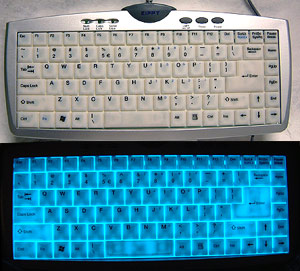
Now you can light up your Quake sessions between friends. I’m going to review the Zippy EL-610 USB keyboard. In its essence, it’s a notebook style keyboard, with a low keystroke and with a special feature. The buttons will glow in the dark, lightening up your keyboard when it’s dark in the room. As you can see in the picture, the light has a blue nuance.
Behind the 88-translucent keys is a flat sheet of electro-luminescent material - the same stuff that puts the glow in “Indiglo” which lights up watch faces around the world.
Like I mentioned, the keyboard should be connected to your USB plug, to receive power, and its main purpose is usage in environments where there is insufficient light. Being only 18mm thick and weighting less than 500g, it would be a great asset to any travel bag. No software is required for this keyboard to work on Windows 2000 or WindowsXP platforms which have at least one USB port free.
The electro-luminescent light generates no heat, but it creates a little imperceptible buzz sound that you hear when you’re a first time users. By using it everyday on a regular basis you finally get to automatically ignore the sound.
Despite my thinking, they’re not expensive. The cheapest I’ve found goes up to ~$45 and the most expensive retails around $60.
Featured tags: computers gadgets keyboard
Sphere this entry»


Posted in Hardware, Gadgets, Reviews by Bogdan Boghiu | 1 Comment »
January 21st, 2007
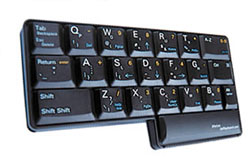
I’ve wrote about many types of keyboards so far, but this is an interesting concept. The Half Keyboard is a one-handed version of the standard desktop keyboard. It uses full-size, high-quality laptop-style keys for excellent typing comfort and speed.
The product in the picture is designed for people that want to type with their left hand. If you want to use your right hand or use them both alternatively, there’s also the 508 keyboard. The 508 Keyboard gives you the best of both worlds � one-hand and two-hand typing. It’s a full-size, standard keyboard and it lets you decide whatever is more convenient.
So, how does it actually work? All you have to do is place your hand on the keyboard, in the standard position. If you take a closer look, the letters under your hand are exactly the same letters on your regular keyboard. Cool, the job is half done so far. How about the other half? Well, to reach the second half, you’ll have to press SPACE, and there we go. Should you need to type a space, tap the key.
You shouldn’t be expecting a high typing rate, especially if you’re a beginner, but the analysts say that after 30 hours of using the Half Keyboard, you can type up to ~88% of your regular typing speed. You decide if it’s worth it or not.
Read the rest of this entry »
Featured tags: computers gadgets keyboard
Sphere this entry»
Posted in Hardware, Gadgets, Reviews by Bogdan Boghiu | 2 Comments »
January 20th, 2007

Fujitsu is developing a technology that allows creating hard drives with a data density of 1TB per square inch (5 times more than what’s today on the market), thus making possible to create 5TB HDD for the desktop users and 1.5TB for nootebooks.
Today’s record for HDD data density is held by Seagate, with a density of 421GB/square inch.
Featured tags: computers hardware hdd
Sphere this entry»
Posted in Hardware by Andrei Diaconu | 1 Comment »
January 17th, 2007
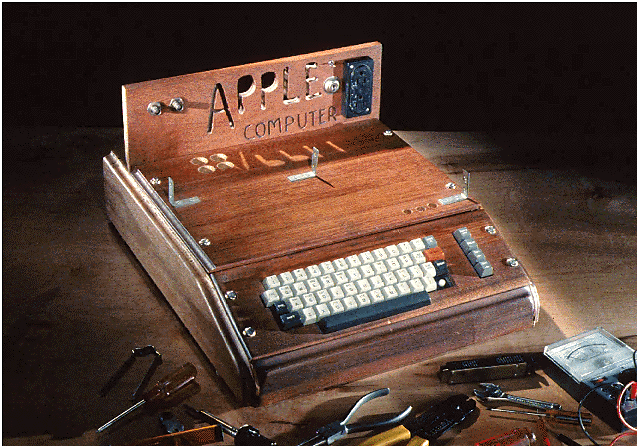
This is Apple I. The first Apple computer. Steve Jobs and Steve Wozniak, the most famous members of the Homebrew Computer Club, designed it over 30 years ago, in 1976. It was mostly a kit computer. Users bought the workings and built their own case.
Many leaders in mainline computer companies like IBM and Digitial did not believe at that time that personal computers were powerful enough to have a market. Sales of the Apple I and other PC’s that followed it, proved them wrong.
Featured tags: apple computers photos
Sphere this entry»
Posted in Hardware, Other by Bogdan Boghiu | No Comments »
January 17th, 2007
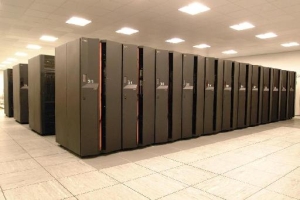
Reading all about the World’s smallest computer and wall mounted computers made me think how does the world’s biggest computer look like.
Well that’s one question I haven’t find a answer to just yet. It seems that the World’s biggest computer is not build just yet but the project was won by IBM in September 2006. We’re talking about the supercomputer project for Los Alamos National Laboratory. Roadrunner, as the supercomputer was nicknamed is meant to perform one petaflop ( that’s 1 quadrillion, for those not familiar with Star Wars like slang) calculations per second, and the U.S. Department of Energy’s National Nuclear Security Administration (NNSA) has disposed a sum of $35 million for the first phase of the project.
The idea behind Roadrunner is to combine 16,000 AMD Opteron processor cores and over 16,000 Cell processors special designed by IBM, Sony and Toshiba to perform physics calculations for the Play Station 3 gaming platform, all that mounted on System x3755 servers with four Opteron processors apiece and IBM BladeCenter H servers with Cell-based systems.They will run using Linux (choke on it Bill) to assign the tasks to be processed to the part of the system that’s ready to handle it, this means that basic tasks can be handled by the Opteron processors and the more complicated mathematical problems will be solved by the Cell processors.
There are several issues to discuss such as the estimated $10 million in operating expenses just for electricity, but by now the project is well underway and we can expect to see the finished behemoth sometimes in the near future, for now the US Government will settle with the smaller brother, the IBM Blue Gene/L, located in the sister laboratory of Lawrence Livermore National Laboratory. The Blue Gene can ‘only’ performs 280 trillion calculations per second, or 280 terraflops (for you to compare Roadrunner will be one quadruple times faster).
Featured tags: big computers
Sphere this entry»
Posted in Hardware by Bogdan Popa | 1 Comment »
January 16th, 2007
Is it impractical? Comfortable? Easy to use? Let’s see.
I can’t help noticing that it looks like an iPod. Not quite, it’s a computer mouse. Actually, it’s one of thinnest mice ever made. It’s developed by Samsung, and it was announced at At the KES tech fair in Seoul Korea, last year. Like the title says, the mouse is only 8mm thick, and the scroll wheel moves from left to right, unlike the regular mice you’ve used so far.
It’s also equipped with 5 buttons and a retractive cable that makes it just perfect for laptops and portable devices. Pricing and availability was still unknown at the end of the year, but we’re looking forward to find out more information related to this product.
However, I wouldn’t feel like using that on my laptop. I’d rather stick to my touchpad than moving around and optical almost-flat piece of thing. If, in your opinion, still think this is thick, you should have a look at the Newton Peripherals website.
Featured tags: computers mouse
Sphere this entry»
Posted in Hardware, Gadgets by Bogdan Boghiu | 1 Comment »