Microsoft invalidates legal copies of Windows

August 27th, 2007

Microsoft invalidates VistaUsers of the Microsoft Windows Genuine Advantage feature, just about all XP and Vista users, could have come face to face with a lovely pirate message from MS over the weekend. A major outage on the servers that handle the WGA process meant that users of XP and Vista may have been unable to validate their legal copy of the OS if they attempted an upgrade or installation. The ‘invalidated’ PCs would not have shut down but the OS would have had its functionality reduced, features such as Aero would have been turned off. Phil Liu, the WGA Program Manager, selflessly stated on the MS forums that

I will personally resolve this issue before I go to sleep - whether or not it is Tuesday I sleep. My goal is to identify a FIX for this issue - afterwards get you all what you are looking for, an explanation and cause.

Fortunately for Phil the issue was fixed on Saturday and according to the WGA blog

We’ve been receiving reports on our forum and through customer service starting last night that Windows Vista validations have been failing on genuine systems. It looks now as though the issue has been resolved and validations are being processed successfully.

If there’s anyone out there who had an issue with validating their Windows OS please share your experience here at Our Picks.

Featured tags:

Sphere this entry»

digg it! reddit! Submit to Netscape Bookmark to delicious StumbleUpon! Newsvine Hugg it!

VNC mod connects your iPhone to Windows desktop

July 12th, 2007

VNC mod for iPhoneNow we’re talking, this is about the most useful thing I’ve seen the iPhone do since its release. Nate True over at cre.ations.net has modified the open source software VNC so that all the Apple fans out there can access their Windows desktop via their snazzy new iPhone.

From his write-up of the VNC mod it sounds as if you are presented with a list of open windows on your desktop and by selecting one of them it is displayed on your iPhone. It also seems to use a funky text box input system for keyboard input as your desktop is viewed as a series of jpeg images and therefore no direct input is possible.

I do wonder how secure your VNC password would be, especially as you’d probably be using your iPhone to do this over someone else’s Wi-Fi network. But the theory is good and it sounds as if Nate has done a great job with this mod for VNC judging by comments on other blogs. Well done mate.

Source: The Boy Genius

Featured tags:

Sphere this entry»

digg it! reddit! Submit to Netscape Bookmark to delicious StumbleUpon! Newsvine Hugg it!

Safari on Windows

June 12th, 2007

Safari BrowserIn Steve Jobs’ keynote speech at the WWDC, he announced that there is a free beta version of Safari available for XP and Vista at Apple downloads. Safari commands a decent 5% of the browser market share and a Windows version will significantly increase this figure.

Not one to complain at being able to play with some free software, I downloaded the beta and had a look around. There’s nothing ground breaking, but I guess Mac users knew that already, the standard multi-tabbed browsing, a funky snapback facility and the usual bookmark, history functionality we’ve all come to expect from a half-decent browser.

However, the main push of Safari for Windows is based on its speed. According to the Safari download page it out strips the other three main browsers in HTML & JS performance and on launch speed. I’m not too sure if that’ll play a major factor in whether the average Windows internet user picks Safari as their browser of choice but more competition has certainly got to be good.

As a web developer I wouldn’t use it that much as I’ve got too many plugins hooked up to Firefox but obviously testing my sites in Safari has now become a whole lot easier!

Featured tags:

Sphere this entry»

digg it! reddit! Submit to Netscape Bookmark to delicious StumbleUpon! Newsvine Hugg it!

Access your Linux partitions under Windows

March 1st, 2007

linuxwindows

You can’t call yourself a computer expert if you haven’t tried at least once one other operating system on your own computer. Bonus points if you tried multi-booting. Either way you want to take it, I am going to share a few suggestion regarding the most popular combination of dual-OS systems. Windows and Linux. A pleasant combo, but accessed separately. By default you cannot view your files from the Linux partition while booting Linux for example.

While Windows uses NTFS or FAT(32) as a file system, Linux uses EXT 2 or EXT 3. Definitely not compatible. However, I have searched and found the following two applications that are meant to do this process way easier for the end-users.

Ext2 Installable File System For Windows
It provides Windows NT4.0/2000/XP/2003 with full access to Linux Ext2 volumes (read access and write access). This may be useful if you have installed both Windows and Linux as a dual boot environment on your computer. The “Ext2 Installable File System for Windows” software is freeware.

If you currently have Windows running and you realize that you need some files for your work which you have stored on an Ext2 volume of your Linux installation, you no longer have to shut down Windows and boot Linux. Furthermore, Windows will now be able to handle floppy disks which have been formatted with an Ext2 file system. Linux Ext3 volumes can also be accessed. Isn’t that nice?

Freeware Linux Reader for Windows
This program plays the role of a bridge between your Windows and Ext2/Ext3 Linux file systems. This easy-to-use tool runs under Windows and allows you to browse Ext2/Ext3 Linux file systems and extract files from there.

There are a number of evident merits of the program, which you should know. First of all, DiskInternals Linux Reader is absolutely free. Secondly, the program provides for read-only access and does not allow you to make records in Ext2/Ext3 file system partitions. This guarantees that the interference in an alternative file system will not affect the work of Linux later. Apart from this, it is necessary to note, that it gives you an opportunity to use common Windows Explorer for extracting data. A preview option for pictures is one more pleasant point, which is worth mentioning. While saving, it ignores file security policies. It means that it is possible to access absolutely any file on a Linux disk from Windows. The program can create and open images of Ext2/Ext3 disks.

Hope at least one of these two programs suit your needs.

Featured tags:

Sphere this entry»

digg it! reddit! Submit to Netscape Bookmark to delicious StumbleUpon! Newsvine Hugg it!

Cool trick to rename your Start button

January 20th, 2007

I remember the first book I read about Windows ‘95. They were beginning proudly to present the differences between it and it’s predecessor, Windows 3.11, and the first thing they mentioned was the Start button.
Now here’s an interesting trick if you’re tired of that green little button in the lower left corner of your screen. It’s quite simple and it doesn’t take more than 2-3 minutes.

If you wonder how come you missed it so far, I’ll tell you. It’s actually hidden, as in not available, and we’re going to have to tweak your computer up a bit.

The process consists in a single step and that would be editing explorer.exe. For this, we will need a simple tool, that I provided for you for a quick download here. It’s called Resource Hack and it’s just about everything we need. So, download the ZIP archive, extract it and run “ResHacker.exe” from inside the archive. Click File, then OPEN, then point out your ‘explorer.exe’ in your Windows directory.

A browsing tree should open with the menus on the left. Click on String Table and you will see some numbers. Expand 37 (or 38) and click on “1033″. You should see a quoted line in the right window, that says: 578,”start”. You can make the desired change for 37 and 38 as well. So, replace the “start” between the quotes with whatever you want it to display, then click “Compile script”.

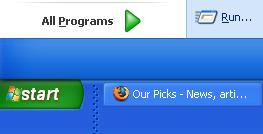
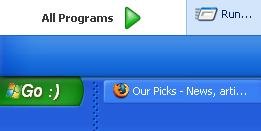
Now, all you have to do is restart your computer, or simply log off and back on. The start button will display the chosen text. Here are sample results below. Enjoy the trick.

startbuttonbefore startbuttonafter
BEFORE AFTER

UPDATE: Due user comments, I’ve considered the following trick. If you can’t overwrite explorer.exe, save the file to “explorer2.exe” for example, in C:\Windows (or whatever your Windows directory is), then you’ll have to tweak up the Registry to accept the settings.

Go to Start, click Run and enter “regedit” in the text box. Push Enter, then browse through the tree up to HKEY_LOCAL_MACHINE -> SOFTWARE -> Microsoft -> Windows NT -> CurrentVersion ->Winlogon. Check out the list, and you’ll have a “Shell” entry mentioning “explorer.exe”. Change it to “explorer2.exe” and reboot/logoff.

This should be it for good ;)

Featured tags:

Sphere this entry»

digg it! reddit! Submit to Netscape Bookmark to delicious StumbleUpon! Newsvine Hugg it!

Windows 386 Promo Ad

January 17th, 2007

The following video has been sped up to make things less painful.

Featured tags:

Sphere this entry»

digg it! reddit! Submit to Netscape Bookmark to delicious StumbleUpon! Newsvine Hugg it!

When Windows acts real bad

January 14th, 2007

Did you ever have one of those days when your computer refuses to listen to your commands? Of course. We all had times like that.
I have put together for you to download, a ~800KB ZIP archive with ~80 funny error messages and Windows instances. Enjoy.

Click here to download the archive

Featured tags:

Sphere this entry»

digg it! reddit! Submit to Netscape Bookmark to delicious StumbleUpon! Newsvine Hugg it!