Here’s another NAS for you, this time from Western Digital. Their My Book Live Personal Cloud drive has three storage capacity options, ranging from 1TB thru 2TB up to a whopping 3TB. The My Book Live gets a few mixed reviews but most seem to indicate that the unit is pretty fast at data transfer but lacks a few bells and whistles of other similarly priced NAS such as a USB port for extra drives.
* Centralize and share media on your home network
* View your photo collection with your iPhone
* Stream media to your entertainment center
* Automatic backup with WD SmartWare for Windows
* Compatible with Apple Time Machine
* Leading-edge performance
* Play your music on any computer in your home
* Secure remote access
System Requirements
* Windows XP (SP3), Windows Vista, Windows 7
* Mac OS X Leopard, Snow Leopard, or Lion
* DLNA/UPnP enabled devices
* Internet connection for remote access
Supported Browsers
* Internet Explorer 7.0 or higher
* Safari 4.0 or higher
* Firefox 3.6 or higher
Pros – Value for money, fast
Cons – No USB port for expansion, no standard NAS features
We’re normally quite keen on Western Digital gear, but the WD My Book Live Personal Cloud drive doesn’t quite do it for us. No USB port, standard NAS features? The Western Digital My Book Live gets a thumbs down from Our Picks.
An average score of 3.2 out of 5 based on these 3 reviews.
NAS seem to be the latest piece of hardware your average consumer seems to be investing in. One of the top models available is the DS212j Disk Station from the Taiwanese company Synology. Currently priced at $220 at Amazon, the Synology DS212j is a great entry level NAS solution for people wanting to centralise their media on their home network and also make it available over the net. The Synology DS212j NAS is a DLNA Certified Media Server, offers the honme user effortless backup and features the EZ-Internet wizard to guide you through setting the unit up for internet access.
* CPU Frequency : 1.2GHz
* Memory : DDR2 256MB
* Internal HDD/SSD : 3.5″ or 2.5″ SATA(II) X 2 (with Disk Holder) (Hard drive not included)
* Max Internal Capacity : 6TB (2X 3TB HDD) (Capacity may vary by RAID types)
* USB 2.0 Port x 2
* 165 X 100 X 225.5 mm
* 0.94Kg
* LAN : Gigabit X1
* 18.3 dB(A)
* Power Consumption : 17.6W (Access) ; 5.5W (HDD Hibernation)
Synology DS212j Reviews
We managed to track down some reviews for you on the Synology DS212j NAS and glowing reviews they were indeed
Pros – affordable, excellent performance, support for 2.5” SSD, low power consumption, almost silent
Cons – no SATA 3 support, swapping drives means taking unit apart
Our Picks verdict
Well what more can we add? The Synology DS212j NAS seems to get a thumbs up from just about everybody and with a just a couple of minor cons we not going to buck the trend. Yes, the DS212j NAS solution gets a big thumbs up from us.
An average score of 4.69 out of 5 based on these 2 reviews.
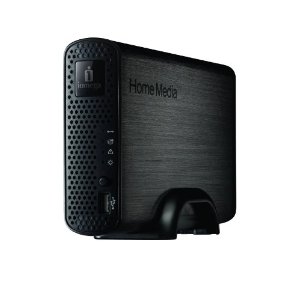
‘Cloud’ is the in-phrase for IT hardware marketeers these days and storage experts Iomega are not going to be left out with their Home Media Network Hard Drive Cloud Edition NAS. And according to their marketeers you can now have your very own ‘Personal Cloud’
Easily share content with friends and family outside of your home using the exclusive Iomega Personal Cloud feature. Invited guests will have access to read and write to files and folders on your network drive.
So you can now go global with your holiday snaps and videos of Junior’s birthday parties and according to Iomega your Personal Cloud is safe, secure, economical, convenient, easy to use and flexible. Of course it functions more than ably as a networked drive providing either 1TB or 2TB of storage depending on the model chosen. There’s also a couple of USB ports for other devices and a lock slot. Here are some other features on Iomega’s Cloud Network Drive
* Simple three step setup – Simply plug into your router, power on, and install the software CD
* Simple content sharing – Access files from any networked Windows, Apple or Linux computer for easy file sharing
* Powerful backup – Backup all the computers on your network simply by downloading and installing the available client backup software. Also compatible with today’s most common backup software applications.
* Copy jobs – One-touch copying via the QuikTransfer button. Easily copy files to and from attached USB drives or any network share, including Iomega Personal Cloud locations using the rsync or CIFS protocol.
* 4.4 x 6.1 x 9.4 inches
* 3.5 pounds
Reviews
We managed to track down one review at Computer Shopper which rated the Iomega Home Media Network Drive at 8.1 with pros as speedy, ease of use whilst user management (part of that cloud access Iomega are so keen to promote) not the greatest thing in the world. Unfortunately the low scoring customer reviews on Amazon also mentioned issues around setup for external access with one user having to contact their ISP to help them out.
Having said that no-one was knocking the Iomega Home Media Network drive for its local NAS capabilties, so it should perform well if that’s what you’re after but of course you are paying extra for the ‘Cloud’.
Know a good story? Send it to tips(at)our-picks.com and we'll read it, turn it inside out, strip it naked, and we might transform it into a shiny front page article. And of course, you'll get your credit :).